
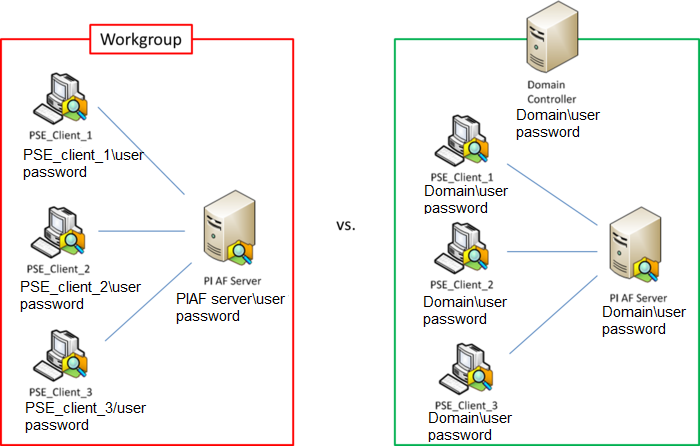
Workgroups and domains are two different methods for organizing and managing computers in a network. Here’s a detailed comparison of the two:
Workgroups
- Structure and Management:
- Decentralized Management: Each computer in a workgroup is managed independently. There is no central control.
- Peer-to-Peer Network: Each computer is considered equal and can function as both a client and a server.
- User Accounts:
- Local User Accounts: Each computer has its own set of user accounts. Users need separate accounts on each computer they want to access.
- No Centralized Authentication: Users must log in separately on each computer, and passwords are not synchronized.
- Network Size and Performance:
- Smaller Networks: Workgroups are suitable for smaller networks, typically up to 10-20 computers.
- Performance: As the number of computers increases, management and performance become more cumbersome.
- Security:
- Basic Security: Security settings are managed on each individual computer.
- No Centralized Security Policies: There is no way to enforce security policies across all computers in the workgroup.
- File and Resource Sharing:
- Simple Sharing: File and printer sharing is typically simple and suitable for small networks.
- Manual Configuration: Sharing resources requires manual configuration on each computer.
- Configuration and Administration:
- Easier Setup: Workgroups are easier to set up and configure, making them ideal for home and small office networks.
- No Advanced Administrative Tools: Lack of centralized management tools makes administration more manual and time-consuming.
Domains
- Structure and Management:
- Centralized Management: Domains use centralized management through domain controllers.
- Client-Server Network: Domain controllers manage resources, security policies, and user authentication.
- User Accounts:
- Centralized User Accounts: User accounts are managed centrally on domain controllers. Users can log in to any computer in the domain using the same credentials.
- Single Sign-On (SSO): Users log in once and can access resources on any computer within the domain.
- Network Size and Performance:
- Larger Networks: Domains are designed for larger networks, from small businesses to large enterprises.
- Scalability: Domains can easily scale to hundreds or thousands of computers and users.
- Security:
- Advanced Security: Security policies are managed centrally, allowing for consistent security across all domain-joined computers.
- Group Policies: Administrators can enforce security settings, software installations, and other configurations using Group Policy.
- File and Resource Sharing:
- Centralized Sharing: Files, printers, and other resources can be shared centrally, with permissions managed through domain controllers.
- Simplified Access Control: Access to resources can be controlled through domain-based permissions and groups.
- Configuration and Administration:
- Advanced Administrative Tools: Domains offer powerful administrative tools, such as Active Directory, to manage users, computers, and resources.
- Complex Setup: Setting up and maintaining a domain requires more expertise and administrative overhead compared to a workgroup.
Key Differences
- Management: Workgroups have decentralized management, while domains have centralized management via domain controllers.
- User Accounts: Workgroups use local accounts; domains use centralized domain accounts with single sign-on capabilities.
- Network Size: Workgroups are suitable for small networks, while domains are designed for larger, scalable networks.
- Security: Domains provide centralized security policies and advanced management features, whereas workgroups rely on individual computer settings.
- Setup and Administration: Workgroups are easier to set up and manage for small environments, while domains require more complex setup and provide robust tools for administration.
In summary, workgroups are ideal for small networks with minimal administrative needs, while domains are better suited for larger networks requiring centralized management, enhanced security, and scalability.


