Control access to files
Controlling access to files in Red Hat Enterprise Linux (RHEL) involves understanding and utilizing file permissions, access control lists (ACLs), and security policies such as SELinux. This detailed note will guide you through these concepts and commands to effectively manage file access.
File Permissions
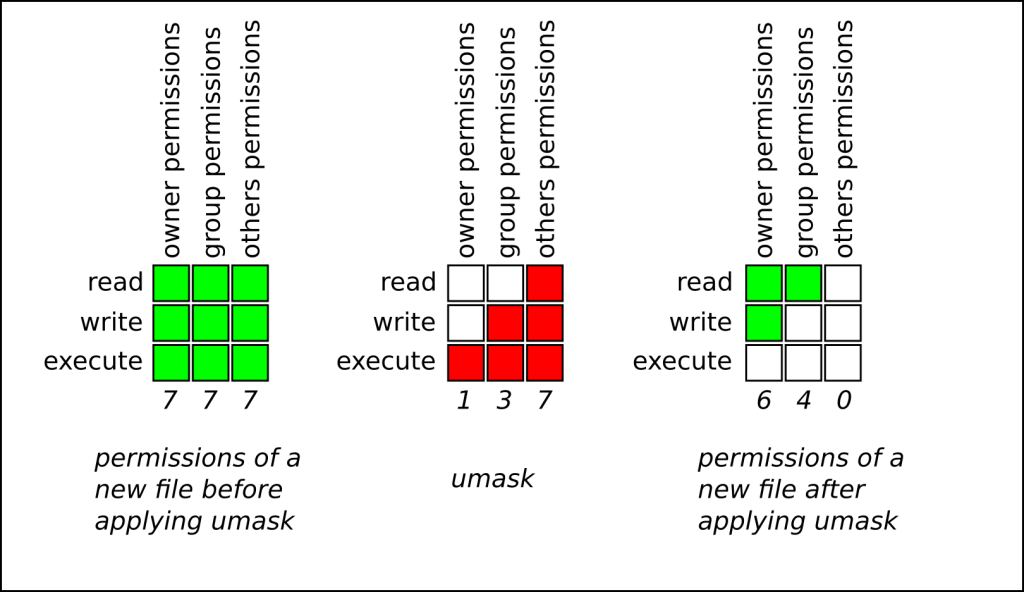
RHEL uses a permission system to control access to files and directories. Each file and directory has three types of permissions for three types of users.
Types of Permissions:
- Read (r): Permission to read the contents of the file or directory.
- Write (w): Permission to modify the file or directory.
- Execute (x): Permission to execute the file or access the directory.
Types of Users:
- Owner (u): The user who owns the file.
- Group (g): The group that owns the file.
- Others (o): All other users.
Viewing Permissions
ls -l [file or directory]
The output will look like:
-rwxr-xr–
Here, the first character indicates the type (- for file, d for directory), and the next nine characters represent the permissions for the owner, group, and others, respectively.
Changing Permissions:
Using chmod command:
chmod [permissions] [file or directory]
Permissions can be specified using symbolic or numeric modes.
Symbolic Mode:
chmod u+rwx,g+rx,o-r [file or directory]
u (user), g (group), o (others), a (all)
+ (add), – (remove), = (set exactly)
Numeric Mode:
chmod 755 [file or directory]
Each digit represents the permissions for the user, group, and others (r=4, w=2, x=1).
File Ownership
Changing Ownership:
Using chown command:
chown [owner]:[group] [file or directory]
chown alice:developers myfile
Changing Group Ownership Only:
Using chgrp command:
chgrp [group] [file or directory]
chgrp developers myfile
Access Control Lists (ACLs)
ACLs provide a more flexible permission mechanism for file systems, allowing you to set permissions for specific users and groups.
Viewing ACLs:
getfacl [file or directory]
Setting ACLs:
Using setfacl command:
setfacl -m u:[user]:[permissions] [file or directory]
Example:
setfacl -m u:alice:rwx myfile
Setting default ACLs for directories:
setfacl -d -m u:[user]:[permissions] [directory]
Example:
setfacl -d -m u:alice:rwx mydir
Removing ACLs:
setfacl -x u:[user] [file or directory]
Example:
setfacl -x u:alice myfile
Removing all ACLs:
setfacl -b [file or directory]
SELinux (Security-Enhanced Linux)
SELinux provides an additional layer of security by enforcing access control policies that restrict what processes can do on the system.
Checking SELinux Status:
sestatus
Viewing SELinux Contexts:
ls -Z [file or directory]
Changing SELinux Contexts:
Using chcon command:
chcon [context] [file or directory]
Example:
chcon -t httpd_sys_content_t myfile
Restoring Default SELinux Contexts:
Using restorecon command:
restorecon [file or directory]
Example:
restorecon myfile
Managing SELinux Policies:
Installing policycoreutils package:
sudo yum install policycoreutils
Using semanage command to manage SELinux policies:
semanage fcontext -a -t [context] [file or directory]
Example:
semanage fcontext -a -t httpd_sys_content_t ‘/web(/.*)?’
Apply the new context:
restorecon -R /web
Examples of Common Scenarios
Set read, write, and execute permissions for the owner and read and execute permissions for the group and others:
chmod 755 myfile
Change the owner to alice and the group to developers:
chown alice:developers myfile
Grant user bob read and write access to a file using ACLs:
setfacl -m u:bob:rw myfile
Set default ACLs so that new files created in a directory inherit these permissions:
setfacl -d -m u:bob:rw /mydir
Set the SELinux context for a file to be used by the httpd process:
chcon -t httpd_sys_content_t myfile
Best Practices
- Regularly audit permissions and ACLs to ensure that they adhere to the principle of least privilege.
- Use SELinux in enforcing mode to provide an additional layer of security.
- Document changes to file permissions, ACLs, and SELinux contexts to maintain an audit trail and ensure reproducibility.
- Backup important configuration files like
/etc/fstab,/etc/passwd, and/etc/groupbefore making significant changes.
By following these guidelines and utilizing the provided commands, you can effectively control access to files and directories on your RHEL system.